
Proxying
Goal: To configure the server to proxy packets to a remote (home) RADIUS server and to perform test authentications against both the proxy server and the home server.
Time: 15-25 minutes
Files:
-
mods-enabled/proxy-realm1 -
sites-enabled/default
Diagram:
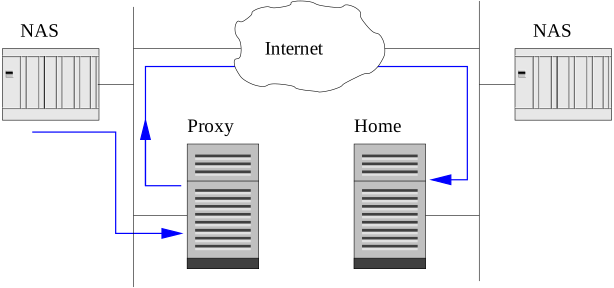
Prerequisites:
-
You already have a working second FreeRADIUS server (the "home" server) running on another machine / IP.
-
It accepts authentication on port 1812 with a known shared secret.
-
It can authenticate users like
bobwith passwordhello.
Configure your (proxy) server to:
-
Handle local users itself (e.g.
bob) -
Proxy users in
@realm1(e.g.bob@realm1.com) to the remote home server. The home server should be configured to authenticate the user with the fullUser-Name(e.g.,bob@realm1.com) and the provided password.
For this exercise, you will configure a RADIUS server to proxy requests to a home RADIUS server that is run by another user.
You will configure a realm, called "realm1", by creating a new module
instance in mods-available/proxy-realm1. This module will point to
the RADIUS server administered by another person who needs to give
you the IP address, port, and shared secret for that server.
The entry for the user "bob" from the New User
exercise, typically located in mods-config/files/authorize, will be
used here.
You can use the radclient commands shown in the Testing section to
simulate the authentication requests.
First, you should verify that authentication requests for user "bob"
are handled locally and result in an Access-Accept without being
forwarded. Then, you should attempt an authentication request for
bob@realm1.com, which should be proxied to the home server.
Once proxying is verified, the home server will be halted. You should
then re-attempt to authenticate bob@realm1.com, and observe how the
proxy server behaves when the home server does not respond.
1. Create the proxy module instance
Create the file: mods-available/proxy-realm1. Add the configuration below and verify that your proxy server points to your home server.
radius proxy-realm1 {
    mode = proxy

    transport = udp

    udp {
	# Change these fields to be correct for your local network
        ipaddr = 192.168.50.200
        port   = 1812
        secret = testing123secret
    }

    # What type of packets to proxy
    type = Access-Request
    type = Accounting-Request

    # What to do if home server does not reply
    status_check = none

    # Optional timeouts (seconds)
    connect_timeout = 3.0
    response_timeout = 3.0
    zombie_period = 40
}
Enable the module in mods-enabled/proxy-realm1:
$ cd mods-enabled
$ ln -s ../mods-available/proxy-realm1 proxy-realm1
2. Modify the virtual server to decide when to proxy
Edit sites-enabled/default
Find the recv Access-Request { , } block.
recv Access-Request {
    if (User-Name =~ /@realm1\.com$/) {
        proxy-realm1

        # Accept the proxied result and stop processing
        if (ok) {
            accept
        }
    } else {
        files
        pap
    }
}
Then, near the bottom of the file, add a new authenticate { , }
section:
authenticate proxy-realm1 {
    proxy-realm1
}
3. Verify the configuration and restart
# Check configuration
$ radiusd -XC

# Run in debug mode to watch what happens
$ radiusd -X
Testing
Once the configuration is there, you can test each piece of functionality, one at a time.
Non-proxied (local) authentication
echo 'User-Name = "bob", User-Password = "hello"' | radclient -x 127.0.0.1 auth testing123Radclient output
Sent Access-Request Id 200 from 0.0.0.0:58423 to 127.0.0.1:1812 length 61
	Message-Authenticator = 0x
        User-Name = "bob"
        User-Password = "hello"
Received Access-Accept Id 200 from 127.0.0.1:1812 to 0.0.0.0:58423 via lo length 43
        Message-Authenticator = 0x31d0d6a1aba5a83a6d77b4187c0562a5
        User-Name = "bob"
Server debug output (main / proxy server with a local user)
(0)      if (User-Name =~ /@realm1\.com$/)  {
(0)        | =~
(0)            | User-Name
(0)              | %{User-Name}
(0)              | --> bob
(0)        | ({bob} =~ (null))
(0)        | --> false
(0)        ...
(0)      }
(0)      else {
(0)          files - | ||
(0)          files - | %logical_or()
(0)            files - | Stripped-User-Name
(0)              files - | %{Stripped-User-Name}
(0)              files - (null)
(0)            files - | User-Name
(0)            files - | %logical_or(...)
(0)              files - | %{User-Name}
(0)              files - | --> bob
(0)            files - | %logical_or(...)
(0)            files - | --> bob
(0)        files - files - Looking for key "bob"
(0)        files - files - Found match "bob" on line 1 of ../mods-config/files/authorize
(0)        files - files - Preparing attribute updates:
(0)          files - Password.Cleartext := hello
(0)        files (ok)
=== Proxied authentication
You can now test a proxied authentication.
echo 'User-Name = "bob@realm1.com", User-Password = "hello"' | radclient -x 127.0.0.1 auth testing123-
Radclient output:
Sent Access-Request Id 130 from 0.0.0.0:43437 to 127.0.0.1:1812 length 72
	Message-Authenticator = 0x
        User-Name = "bob@realm1.com"
        User-Password = "hello"
Received Access-Accept Id 130 from 127.0.0.1:1812 to 0.0.0.0:43437 via lo length 54
        Message-Authenticator = 0x591568951632aae69f913f707912e464
User-Name = "bob@realm1.com"-
Server debug output (main / proxy server with proxied user):
(0)      if (User-Name =~ /@realm1\.com$/)  {
(0)        | =~
(0)            | User-Name
(0)              | %{User-Name}
(0)              | --> bob@realm1.com
(0)        | ({bob@realm1.com} =~ (null))
(0)        | --> true
(0)        proxy-realm1 - proxy-realm1 - [1] Trunk connection assigned request 1
(0)        proxy-realm1 - Sending Access-Request ID 0 length 0 over connection proto udp local 10.0.16.96 port 37726 remote 44.222.160.231 port 1812
(0)          proxy-realm1 - Message-Authenticator = 0xb8c474a818edf42917887303b3181172
(0)          proxy-realm1 - User-Name = "bob@realm1.com"
(0)          proxy-realm1 - User-Password = "hello"
(0)          proxy-realm1 - Packet {
(0)            proxy-realm1 - Id = 130
(0)            proxy-realm1 - Authenticator = 0x970cd7fde6e8fefc4d155017d1a0bed1
(0)          proxy-realm1 - }
(0)          proxy-realm1 - Packet-Type = ::Access-Request
(0)          proxy-realm1 - Proxy-State = 0x6836cf35495baced
(0)        proxy-realm1 - Proxied request.  Relying on NAS to perform more retransmissions
(0)        proxy-realm1 - Received Access-Accept ID 0 length 48 reply packet on connection proto udp local 10.0.16.96 port 37726 remote 44.222.160.231 port 1812
(0)          proxy-realm1 - Message-Authenticator = 0xb0438c94e081c9c66b194a770b38bd5f
(0)          proxy-realm1 - Proxy-State = 0xedac5b4935cf3668
(0)        proxy-realm1 - proxy-realm1 - Resuming execution
(0) proxy-realm1 (ok)-
Proxy server debug output (when proxied packet arrives on a v3 server):
(0) suffix: Checking for suffix after "@"
(0) suffix: Looking up realm "realm1.com" for User-Name = "bob@realm1.com"
(0) suffix: Found realm "default"
(0) suffix: Adding Stripped-User-Name = "bob"
(0) suffix: Adding Realm = "default"
(0) suffix: Authentication realm is LOCAL
(0)     [suffix] = ok
(0) files: users: Matched entry bob at line 2
(0)     [files] = ok
(0)     [pap] = updated
(0)   } # authorize = updated
(0) Found Auth-Type = PAP
(0) # Executing group from file ../sites-enabled/default
(0)   Auth-Type PAP {
(0)     [ok] = ok
(0)   } # Auth-Type PAP = ok
Questions
-
How would you configure the server so that "realm1" was not proxied, but was instead handled by the local RADIUS server?
-
Will it make any difference for the home server if the request sent to the proxy contains CHAP-Password instead of User-Password?
-
Since the User-Password is encrypted with the RADIUS shared secret, what happens to it when a request is proxied?